In music, a sampler is an instrument that plays back recorded sound. You load in a recording, called a sample, and the sampler lets you play it from a keyboard, so every key plays that sound at a different pitch. Feed it a drum hit and you have a drum instrument. Feed it a piano note, or a whole set of them, and you have a playable piano. The recording is the raw material, and the sampler is what turns it into something you play.
Applies to any sampler in any DAW. The idea is the same whether the sampler is built into your software or loaded as a separate plugin. Nothing here is tied to one product or one brand.
A sampler plays back recorded audio and lets you play those recordings like notes. The recordings are called samples. A sample can be almost anything: a single drum hit, a plucked string, a sung note, a chord lifted off a record, a field recording. The sampler takes that fixed piece of audio and puts it under your fingers, so pressing a key plays it back, and different keys play it at different pitches.
This is one of the oldest ideas in electronic music, and it still matters. Instead of building a sound from nothing, you start from a real recording and shape it from there. Because the starting point is an actual sound, a sampler can be as realistic or as strange as whatever you feed it. The same instrument plays a convincing piano or a mangled loop of a slammed door, depending only on the audio inside.
A sample is the recording itself, a piece of audio sitting in a file. A sampler is the instrument that loads that audio and lets you play it. People shorten both to sampling, so the words blur together, but one is the material and the other is the tool.
You load a sample, map it across the keyboard, and shape it. Loading puts your recording into the instrument. Mapping tells the sampler which key matches the sample's real pitch, and from there it pitches the sound up as you play higher and down as you play lower, so one recording covers the whole keyboard. Shaping is where you treat that sound like any other instrument.
The pitch part is mechanical. Play a higher key and the sampler runs the recording faster, so it comes out higher. Play a lower key and it runs slower and lower. That is how a single note can become a full playable range. One side effect worth knowing is that plain repitching also changes length, so high notes run short and low notes run long, which samplers get around with looping and time-stretching. Under the hood a sample is ordinary digital audio, stored at a sample rate and bit depth like any recording, and our guide on what sample rate and bit depth mean explains those two numbers.
Once the sound is under your fingers, you shape it with the same tools as a synth. An envelope sets how it fades in and out, so a sharp recording can become a slow swell. A filter opens and closes the tone. Effects like reverb, delay and distortion sit on the end. None of this changes the recording on disk. It changes how the recording is played, so you can keep the original sample and still make it sound like many different things.
Getting one recording to play in tune and hold across the keyboard is a craft of its own. Our guide on how to turn a sample into an instrument walks through setting the root note, looping a sustain and keeping the sound moving so it does not feel dead.
There are two broad jobs. A one-shot sampler plays short sounds once, which suits drum hits, stabs and effects. A multisample instrument uses many recordings at once to play a realistic pitched instrument, like a piano, strings or a choir, across the whole keyboard. Most samplers do both, and the setup you choose depends on the sound you are after.
A one-shot plays the sample from start to finish and stops, whatever you do with the key. That is what you want for percussion and for stabs, sounds with a natural beginning and end. Load a kit of hits across the pads and you are playing drums. A multisample, sometimes called a ROMpler-style instrument, is built from a lot of recordings instead. A real piano is sampled note by note, often several times at different playing strengths, and the instrument picks the right recording for the key you press and how hard you press it. That is how software can sound like a convincing acoustic instrument rather than one note stretched thin.
Along the way there are a handful of features you will meet in almost any sampler:
| Feature | What it does |
|---|---|
| One-shot | Plays a sample once from start to finish, good for drum hits, stabs and effects |
| Multisample | Uses many recordings across the keyboard to play a realistic pitched instrument |
| Slicing | Cuts a loop into separate pieces and lays each one on its own key so you can play or reorder them |
| Sustain loop | Repeats a steady section of the sound so a short recording holds for as long as you keep the key down |
| Round-robin | Rotates through a few takes of the same note so fast repeats do not sound identical |
| Velocity layers | Swaps to a different recording depending on how hard you play, so soft and loud notes sound different |
If a sample is someone else's recording, you usually need permission to use it, and that can mean a licence or clearance. The simple habit is to sample your own sounds, or to use samples that are cleared or sold as royalty-free. It keeps you on safe ground, and the result is yours to release.
Samplers come in a few broad kinds: hardware boxes, software instruments on your computer, ready-made sample libraries, and creative samplers built to reshape a sound rather than reproduce it. They all do the same core job of turning a recording into something you can play. What changes is where the sampler lives and what it is best at.
| Type | What it is | Good for |
|---|---|---|
| Hardware sampler | A standalone box with pads or keys, often with a sequencer built in, in the tradition of the Akai MPC | Making and arranging beats away from the computer, and playing live |
| Software sampler | A plugin, or an instrument that ships with your DAW | Everyday production, and the cheapest way in, since you probably own one already |
| Sample library instrument | A ready-made multisample of a real instrument, often called a ROMpler, that plays recordings someone else has already made | Realistic piano, strings, choir and orchestral parts |
| Granular or sculpting sampler | Breaks a recording into tiny slices called grains and rebuilds them into new textures, drones and rhythms | Sound design, ambient music and film texture |
The line between them is blurry. Plenty of hardware samplers load sounds from a computer, most software samplers can slice and stretch, and a lot of modern instruments mix several of these ideas in one place. If you are just starting out, the software sampler already in your DAW is enough to learn everything on this page.
Almost certainly, yes. Every major DAW ships with at least one sampler, so you can start sampling without buying anything. Here is where to find it in the most common ones:
| DAW | Built-in sampler |
|---|---|
| Ableton Live | Simpler in every edition, and Sampler in Live Suite |
| Logic Pro | Sampler and Quick Sampler |
| FL Studio | The Sampler channel, plus Slicex in Producer Edition and up |
| Studio One | Sample One XT, and Impact XT for pad-based drums |
| Cubase | Sampler Track |
| Bitwig Studio | Sampler |
| Reaper | ReaSamplOmatic5000 |
Names and editions change between versions, so if one is missing, check your DAW's list of instruments. Beyond the built-in ones there is a whole world of third-party samplers, from large library players like Native Instruments Kontakt to small creative instruments that treat a recording as clay.
A synth generates sound and a sampler plays back a recording. That is the whole difference at the source. A synthesizer builds a tone from scratch using oscillators, so there is no recording involved at all. A sampler starts from real audio you loaded in. One makes sound; the other replays sound that already exists.
Everything after that stage looks similar. Both run the sound through an envelope, a filter and an LFO, both take effects on the end, and both are played from a keyboard, so the controls feel much the same. The split is only at the raw material: a synth's is a generated waveform, a sampler's is a recording. Our guide on what is a synthesizer covers how a synth builds a sound from nothing.
In practice the line is soft. Many modern instruments do both, playing back samples and generating tones side by side, and a wavetable synth sits somewhere in between the two. The plain distinction is still worth keeping, though: if the sound starts as a recording, you are sampling; if it is generated from scratch, you are synthesising.
Sampling started on tape and went digital around 1980. Before computers could store sound, the Mellotron, first sold in 1963, did it mechanically: every key played a real tape recording of a string, flute or choir note. The idea of playing recordings from a keyboard is older than digital audio.
The first digital samplers, the Fairlight CMI in 1979 and the E-mu Emulator in 1981, were expensive studio machines. The big change came in the late 1980s, when cheaper drum samplers like the E-mu SP-1200 in 1987 and the Akai MPC60 in 1988 put sampling in the hands of producers working on their own. Their chopped, gritty sound helped define hip-hop, and our guide on how to make boom bap shows how that style still works.
Today most sampling happens in software, inside a DAW, on a laptop. The workflow those old machines set, load a sound, chop it and play it from pads or keys, is still how almost every sampler works.
The heart of sampling is taking one recording and turning it into something you can play and hold. That is easy to read about and slower to feel, so it helps to try it on a sound of your own.
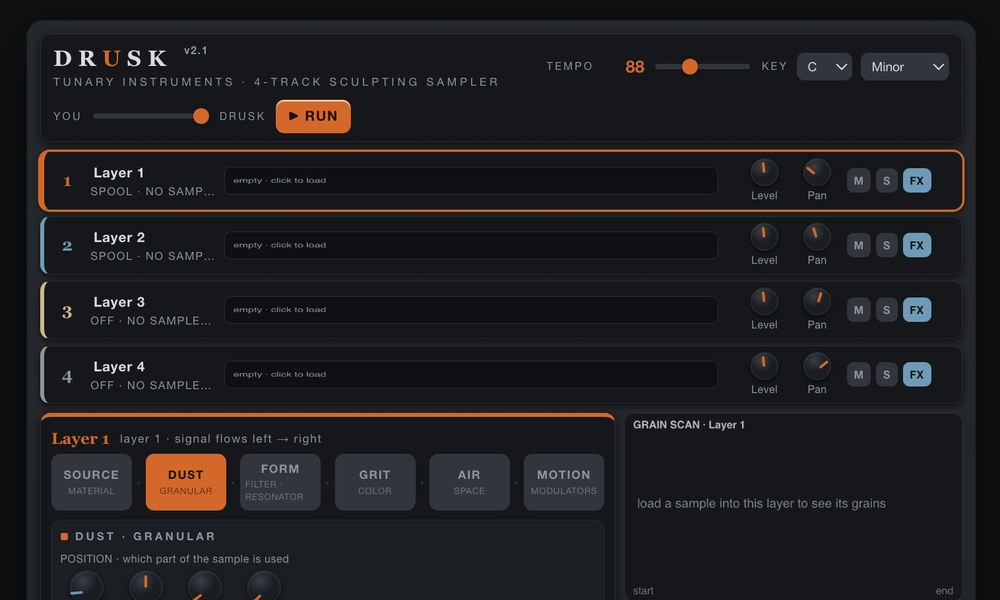
DRUSK is a four-track granular sculpting sampler. Drop in any sound, a field recording, a note, a voice, and it breaks that recording into grains you can stretch into drones, scatter into clouds or chop into glitching rhythms, with an effects chain on each track. Slide its COMPOSER control up and it goes a step further: it works out what your sound is and writes bass, melody, drums and chords around it, every note in key. The full instrument runs in your browser, and as a plugin: AU, VST3 and AAX on Mac, and VST3 on Windows.
To be straight about it, DRUSK is not a multisample library. It will not give you a note-by-note grand piano across the keyboard. It is built for the creative side of sampling: taking a recording of your own and turning it into new material.
No download and no signup to try it in the browser. Prefer a tape-loop take on the same idea? SILT wears a recording into an evolving, tape-worn texture. And everything above still works by hand in any sampler, which is rather the point of writing it down.
We write these when there is something worth writing down. One email when a new one lands or a new Tunary instrument ships. No newsletter, no schedule.
 Tunary